
3. Add your community repository
A repository is a web folder that contains repo.json. Your community publishes its URL; it must point at that folder, not at the website in general.
- Open Repositories.
- Paste the URL into the first field.
- Optionally type a display name. It is only a label, but it also seeds the folder name.
- Optionally type a subfolder name, or leave it empty to derive one.
- Press Add. The repository becomes the active one.
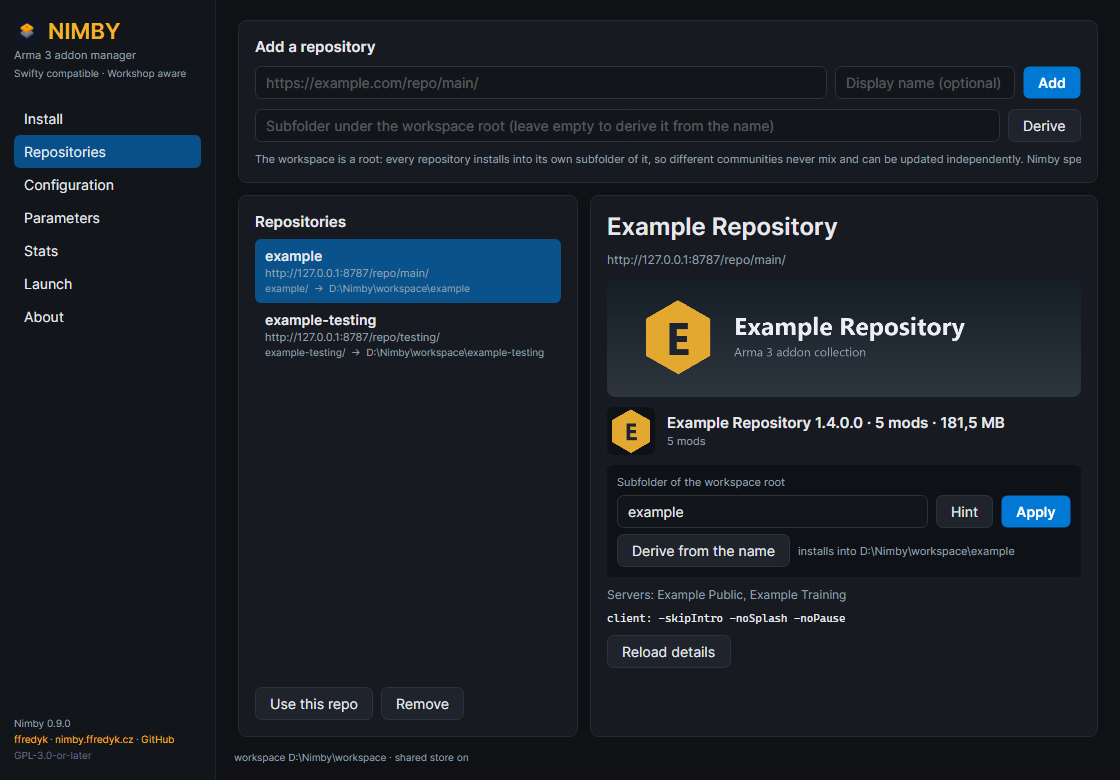
The Repositories page: add form on top, the list on the left, details on the right.
One repository, one folder. The workspace root is a container, not an install target: every repository installs into its own subfolder (E:\Nimby\ExampleRepo, E:\Nimby\OtherCommunity), so two communities never mix and update independently. Names are cleaned to letters, digits, _, . and -; anything else becomes -, and two repositories never share a folder: the second one gets a -2 suffix.
Renaming: select the repository, edit Subfolder of the workspace root, press Apply; Derive from the name restores the automatic name. A rename only changes where the next install and launch look. Existing mods stay in the old folder, so rename before the first install or move the folder in File Explorer afterwards.
Active means "the repository the other pages talk about". Install, Launch, Verify and Status act on the active repository; Update, Stats and Repair cover every configured repository. The active entry carries a * in nimby repo list, and Use this repo switches it.
The details panel shows the repository's artwork (repo.png banner, icon.png icon), version, mod count and size, the server list and the client parameters it asks for. Reload details re-reads them; artwork is cached under %APPDATA%\Nimby\images. Remove forgets the repository and never deletes installed mods.
For scripts:
nimby repo add "https://example.com/repo/main/" --name "Community" --folder Community --select
nimby repo list
nimby repo folder "https://example.com/repo/main/" Community
nimby repo select "https://example.com/repo/main/"