
4. Configure paths
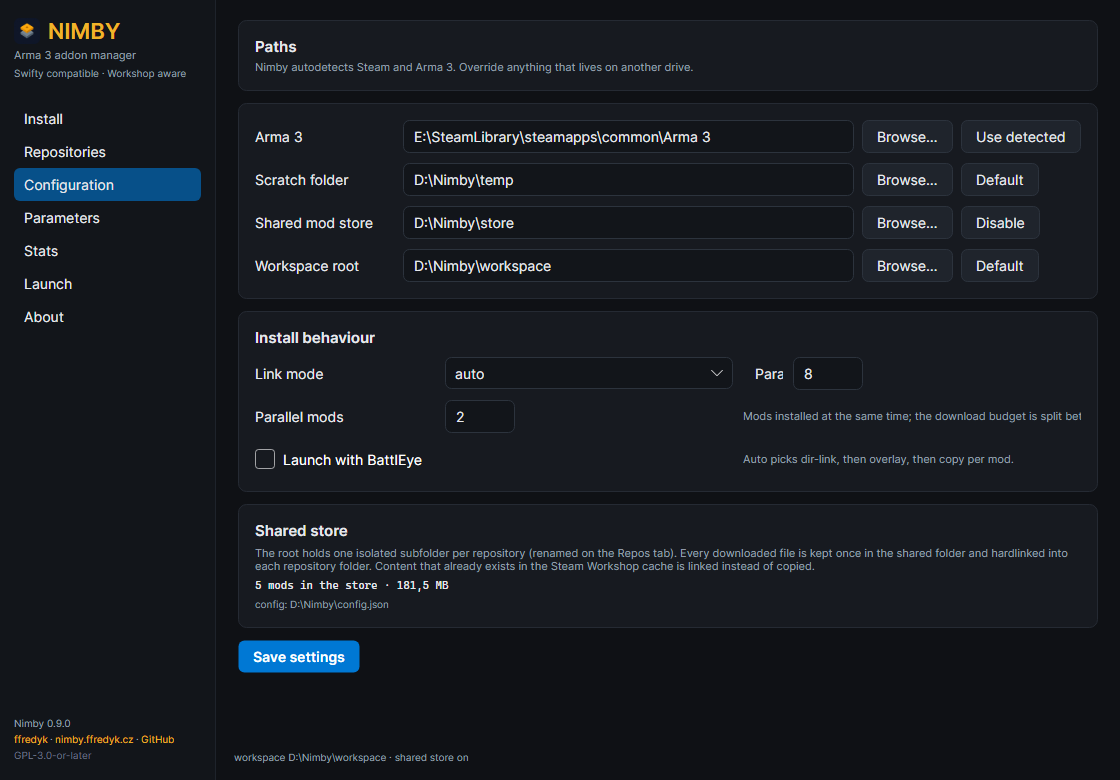
The Configuration page: paths on top, install behaviour and the store summary below.
- Arma 3. Steam libraries are scanned automatically (registry, then
libraryfolders.vdf) and<library>\steamapps\common\Arma 3is used when found; otherwise press Browse…. Use detected fills in the detected path; a folder is accepted when it holdsarma3_x64.exeorarma3.exe. - Scratch folder. Partial downloads; default
%TEMP%\nimby, best on a fast local disk. - Workspace root. The container from section 3; default
%LOCALAPPDATA%\Nimby\mods. Pick a drive with room and keep the path short — a shorter root means a shorter-mod=command line (section 7). - Shared mod store. Optional. Every downloaded file is kept once under
<store>\@mod\…and hardlinked into each repository folder, so a second repository that uses the same mod downloads nothing. With one repository it buys nothing; keep it on the same drive as the workspace root so files can be hardlinked. - Press Save settings; the configuration file in use is shown at the bottom.
Link mode decides how files reach the mod folder. auto, the default, chooses per mod: when every file already exists byte-identical in the Workshop cache or the store, the whole @mod folder is linked in one step; otherwise matching files are linked and only the missing ones are downloaded. Alternatives: dir-link (link only, otherwise download), overlay (always link per file), copy (never link) and passthrough (do not materialize, launch from the source folder). Parallel (default 8, 1–32) is the concurrent file transfers per mod; parallel mods (default 2, 1–16) is how many mods install at once. The two values multiply, so the budget is shared between active mods.
Launch with BattlEye sets the default for launches and selects arma3battleye.exe. The Launch page can enable it for a single launch without changing the setting.